

Equivalent Values are commonly used abbreviations or truncations that Importacular NXT can use to help it find suitable matches, either in Record Lookup Matching rules or in Address Area Settings. These Equivalent Values are used when considering matches on First Names, Address Lines and Organisations Names. For example, ‘Rob’ instead or ‘Robert’, ‘St’ instead of ‘Street’ and ‘Ltd’ instead of ‘Limited’.
Zeidman Development provides a whole host of Equivalent Values for all users to enjoy, but you can also create new ones or add to existing Equivalents. To do this, simply head to the ‘Settings’ area on the left-hand side of the application and click on the tab ‘Equivalent Values’.
Here you can select the type of Equivalent and then search for an Equivalent Names.
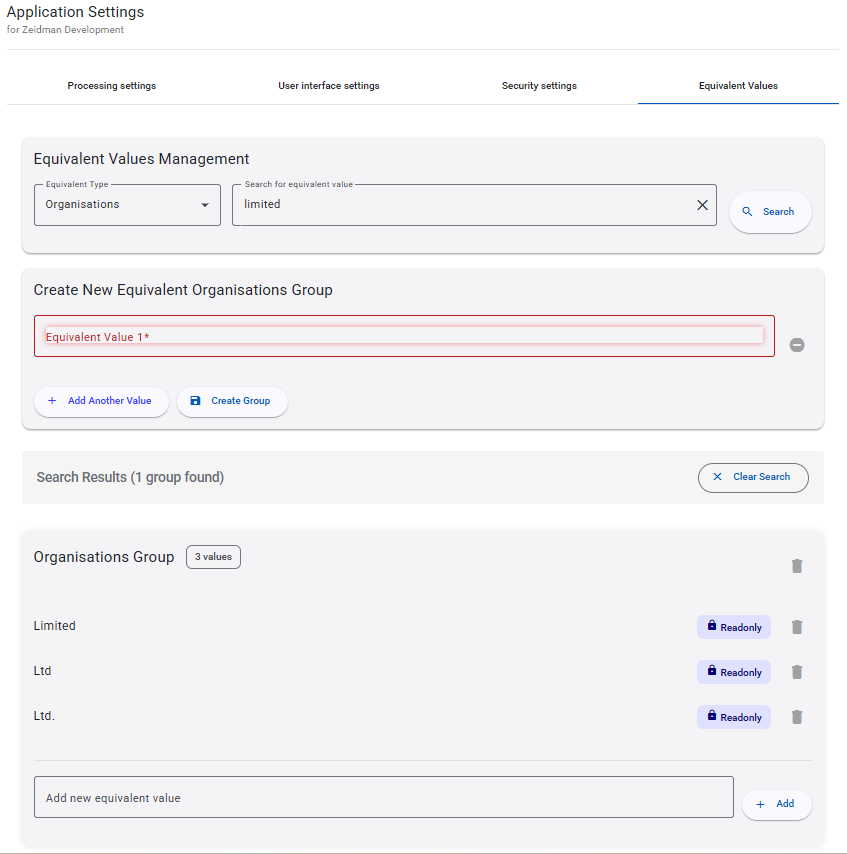
You can choose to ‘Add Another Value’ to an existing ‘Group’, or create a new ‘Group’ and add equivalent values to that.
Equivalent Groups and Values provided by Zeidman Development are marked as ‘Read Only’