

Importacular will attempt to import dates into Raiser’s Edge in the format that Raiser’s Edge expects. If dates are imported that do not have the expected format it may be necessary to transform them. Two common examples are: 1. the incoming date format is in a US format of Month/Day/Year (or MM/dd/yyyy), but the value RE will accept is Day/Month/Year (or dd/MM/yyyy), or 2. the incoming date format is in a US format of Month/Day/Year with leading zeros (or MM/dd/yyyy), but the value RE will accept is Month/Day/Year without leading zeros (or M/d/yyyy)
If you head to the Field Manipulations section on a Date field, you will see that we have provided a number of formats to select from or to enter in your own format. It is important to highlight that you are entering in the format of the INCOMING date, not the date format RE will accept. Once you select the format you want or enter in your own, you will see a sample of the date format proposed on bottom left -hand side of the dropdown and the actual format code being used on the bottom right-hand side.
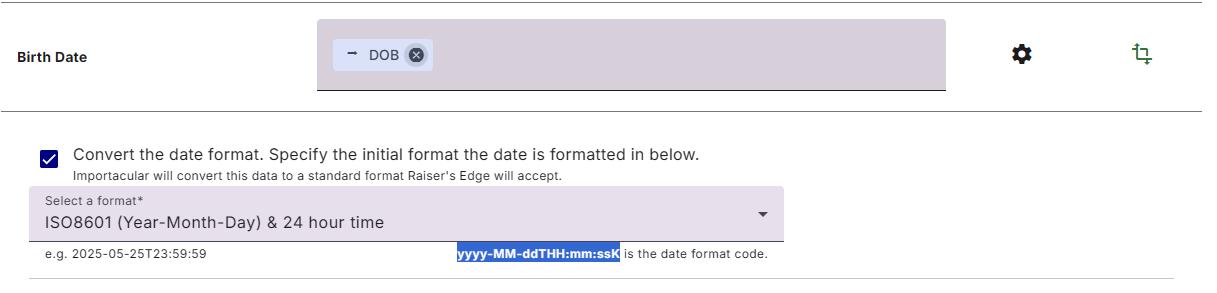
This format code can be copied, pasted and adjusted, should you wish to use it as a baseline for creating your own date format.
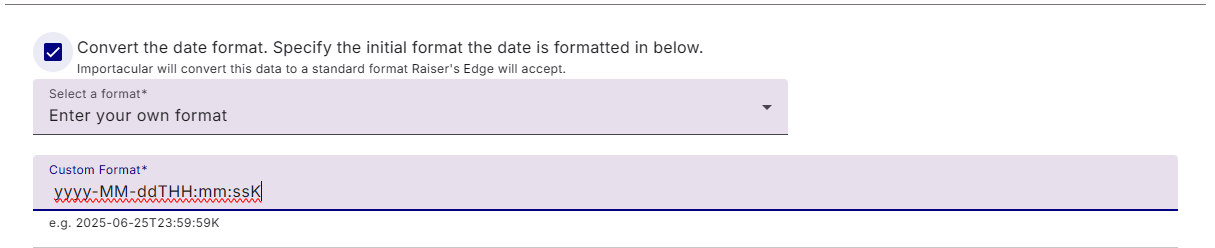
When creating your own, know that it uses .Net formatting and you create a custom format using the following combinations of letters. Please note that these formats are case sensitive. See below for more information.
Adjusting the Date
As well as telling Importacular what the incoming date format is, you can also set Importacular to add or subtract a set number of days, months or years from the incoming date, or use the current date and adjust that in the same way
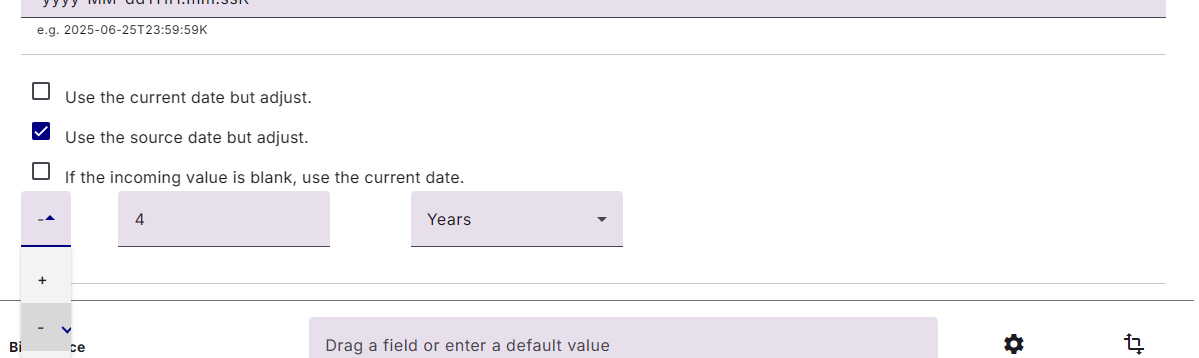
If the incoming date is blank, you can also set Importacular to use the current date.
Fuzzy Dates
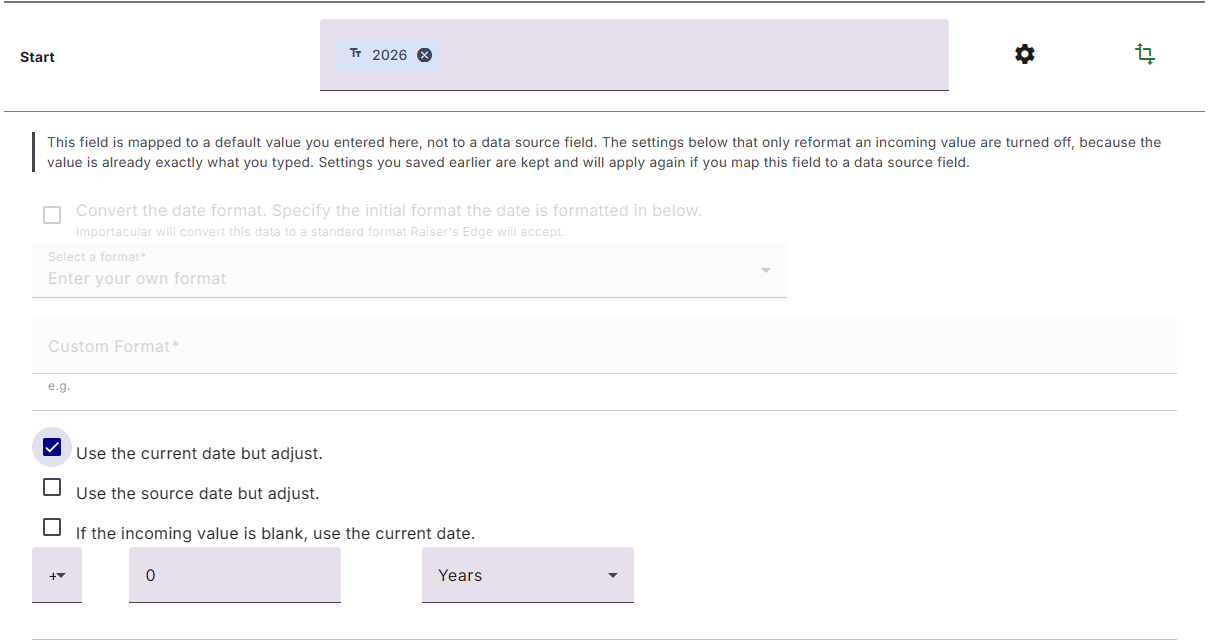
There are some date fields that will accept partial date information. For example just a Day and a Month, or perhaps just a year. These are called Fuzzy Dates and are presented in Importacular differently to regular dates. When you select a default value on a Fuzzy Date field, instead of a calendar to select a suitable date, you are presented with an option to populate a day, a month or, a year:
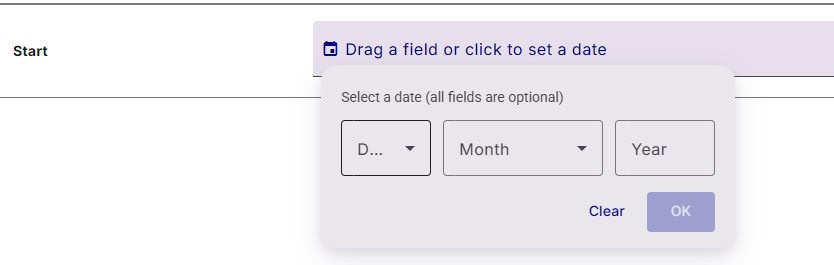
Since it would be a Default Value, some Field Manipulations are turned off, but you can set Importacular to adjust the date using the source date or the current date. If you set it to use Current Date, it will maintain the Fuzzy Date format used in your Default Value. For example, if I use just 2026 as my default value and set it to use current date, the value imported will be 2026 if I imported in 2026. If I use the exact same template in 2027, the value that would be imported would be 2027
.Net date format code
| Letter | Meaning |
| d | Represents the day of the month as a number from 1 through 31. A single-digit day is formatted without a leading zero |
| dd | Represents the day of the month as a number from 01 through 31. A single-digit day is formatted with a leading zero |
| ddd | Represents the abbreviated name of the day of the week (Mon, Tues, Wed etc.) |
| dddd | Represents the full name of the day of the week (Monday, Tuesday etc.) |
| h | 12-hour clock hour (e.g. 7) |
| hh | 12-hour clock, with a leading 0 (e.g. 07) |
| H | 24-hour clock hour (e.g. 19) |
| HH | 24-hour clock hour, with a leading 0 (e.g. 19) |
| m | Minutes |
| mm | Minutes with a leading zero |
| M | Month number |
| MM | Month number with leading zero |
| MMM | Abbreviated Month Name (e.g. Dec) |
| MMMM | Full month name (e.g. December) |
| s | Seconds |
| ss | Seconds with leading zero |
| t | Abbreviated AM / PM (e.g. A or P) |
| tt | AM / PM (e.g. AM or PM |
| y | Year, no leading zero (e.g. 2001 would be 1) |
| yy | Year, leading zero (e.g. 2001 would be 01) |
| yyy | Year, (e.g. 2001 would be 2001) |
| yyyy | Year, (e.g. 2001 would be 2001) |
| K | Represents the time zone information of a date and time value (e.g. +05:00) |
| z | Represents the signed offset of the local operating system’s time zone from Coordinated Universal Time (UTC), measured in hours. (e.g. +6) |
| zz | As z but with leading zero (e.g. +06) |
| zzz | Represents the signed offset of the local operating system’s time zone from UTC, measured in hours and minutes. (e.g. +06:00) |
| f | Represents the most significant digit of the seconds fraction; that is, it represents the tenths of a second in a date and time value. |
| ff | Represents the two most significant digits of the seconds fraction; that is, it represents the hundredths of a second in a date and time value. |
| fff | Represents the three most significant digits of the seconds fraction; that is, it represents the milliseconds in a date and time value. |
| ffff | Represents the four most significant digits of the seconds fraction; that is, it represents the ten thousandths of a second in a date and time value. While it is possible to display the ten thousandths of a second component of a \time value, that value may not be meaningful. The precision of date and time values depends on the resolution of the system clock. On Windows NT 3.5 and later, and Windows Vista operating systems, the clock’s resolution is approximately 10-15 milliseconds. |
| fffff | Represents the five most significant digits of the seconds fraction; that is, it represents the hundred thousandths of a second in a date and time value. While it is possible to display the hundred thousandths of a second component of a time value, that value may not be meaningful. The precision of date and time values depends on the resolution of the system clock. On Windows NT 3.5 and later, and Windows Vista operating systems, the clock’s resolution is approximately 10-15 milliseconds. |
| ffffff | Represents the six most significant digits of the seconds fraction; that is, it represents the millionths of a second in a date and time value. While it is possible to display the millionths of a second component of a time value, that value may not be meaningful. The precision of date and time values depends on the resolution of the system clock. On Windows NT 3.5 and later, and Windows Vista operating systems, the clock’s resolution is approximately 10-15 milliseconds. |
| fffffff | Represents the seven most significant digits of the seconds fraction; that is, it represents the ten millionths of a second in a date and time value. While it is possible to display the ten millionths of a second component of a time value, that value may not be meaningful. The precision of date and time values depends on the resolution of the system clock. On Windows NT 3.5 and later, and Windows Vista operating systems, the clock’s resolution is approximately 10-15 milliseconds. |
| F | Represents the most significant digit of the seconds fraction; that is, it represents the tenths of a second in a date and time value. Nothing is displayed if the digit is zero. |
| : | Represents the time separator defined in the current DateTimeFormatInfo..::.TimeSeparator property. This separator is used to differentiate hours, minutes, and seconds. |
| / | Represents the date separator defined in the current DateTimeFormatInfo..::.DateSeparator property. This separator is used to differentiate years, months, and days. |
| “ | Represents a quoted string (quotation mark). Displays the literal value of any string between two quotation marks (“). Your application should precede each quotation mark with an escape character (\). |
| ‘ | Represents a quoted string (apostrophe). Displays the literal value of any string between two apostrophe (‘) characters. |